

Normally while performing iOS or Android mobile application penetration tests, we request a custom app from the client to circumvent controls like certificate pinning, and Android's app certificate trust complexities. These are controls that can be bypassed, but it's time-consuming and finicky enough to do so, that it's not a great use of time when the engagement is only a 3-5 day test. However, sometimes a client just wants us to grab the app directly from the platform's App Store. That works when testing against the app's production APIs, or when the app is configurable to point to different environments. But what about the case where the app is not configurable, and they want us to test against a pre-prod (e.g. SIT, Staging) environment?
The first thing to try is probably to use Burp's Hostname Override configuration to direct the traffic to the staging IP. An entry like the example below:
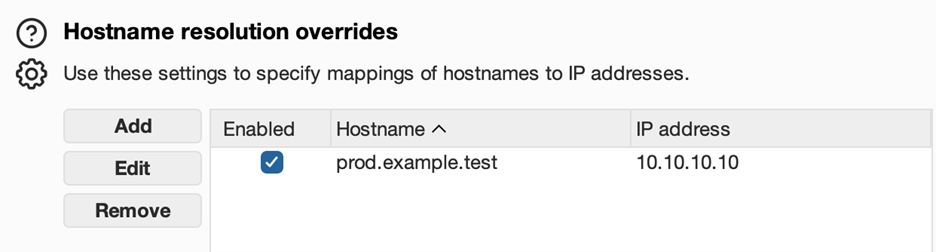
This option is in Burp's Network > DNS settings. I would set the override using the production server hostname (the name the prod app from the app store already calls), and the IP address of the staging server. I might determine that staging server IP through an nslookup if I have to, or just receive it from the client.
This will route the traffic to the correct IP, but it's rarely enough on its own. Often, the Host header is used in routing from the edge services, reverse proxy, etc. This means the Host header on the request needs to match the actual host it's going to, let's say staging.example.test. No problem, Burp supports rewriting rules that can be used for that too. HTTP match and replace rules are found in the settings under Tools > Proxy, and even has a prefilled example of a Host header rewrite rule, highlighted in the picture below.
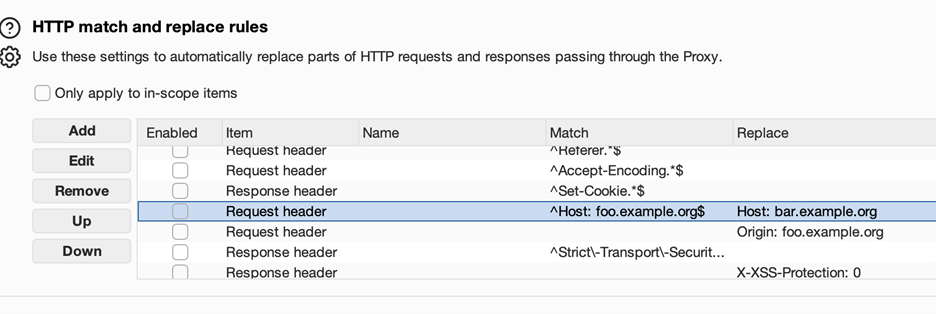
Updating the Match field to the production host, and the Replace field to the staging host, and enabling the rule, should be all that is needed here for most calls originating from the native mobile app directly. If the app also has WebPane or embedded browser type UI controls that are interacting with the backend server directly, you may need to do similar rewrites of the Origin header. I have not yet encountered a case where the Referer header needed to be rewritten, but it's theoretically possible as well.
In many past cases, I have found just the DNS Override and Host header replacement to be sufficient.
Scoping a mobile app pentest?
Decisions like which environment to test against, whether to provide a custom build, and how to handle certificate pinning all affect the quality of results. We break down the key considerations in our mobile testing guide.
Read: Mobile Testing ConsiderationsHowever, I recently had a case where the backend was served through Cloudflare, and this request modification failed due to SNI (Server Name Indication). What this really means is that, while my request specified staging.example.test, and my traffic was directed to staging.example.test, the client in the TLS handshake sent a clienthello for prod.example.test. The server found that the FQDN was incorrect, because it wasn't staging.example.test, and dropped the connection.
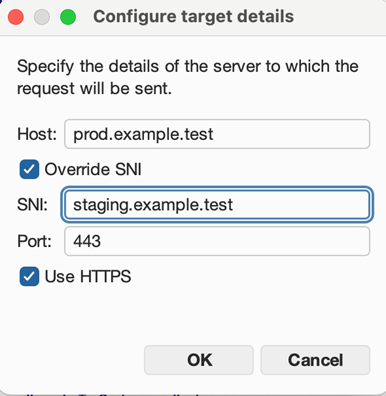
If Burp has the capability of solving this more broadly, I was unable to find the correct options to do so. Repeater specifically has an SNI override option in the target details, but that really doesn't solve the larger problem in this context. A picture of that option is below.
What has worked for this, for me, is actually modifying the SNI host during the TLS handshake. Since I couldn't do this in Burp, I added mitmproxy to the chain, as an upstream proxy between Burp and the server. So the full chain was MobileDevice (physical or virtual) > Burp > mitmproxy > Server. Mitmproxy has the hooks I needed to rewrite this with a custom addon. The full code for that plugin (sni_rewrite.py) is below:
# SNI rewrite + host reroute addon
#
# Staging is on a separate Cloudflare zone from prod, so:
#   - TCP connection is rerouted to STAGING_HOST (resolved via SOCKS tunnel)
#   - Host header is rewritten to STAGING_HOST (staging app expects its own hostname)
#   - SNI in the TLS ClientHello is set to STAGING_HOST (staging CF zone requires it)
# The iOS app only ever sees PROD_HOST — the rewrite is invisible to it.
import os
import mitmproxy.tls
from mitmproxy import http

PROD_HOST    = os.environ.get("PROD_HOST", "")
STAGING_HOST = os.environ.get("STAGING_HOST", "")

class HostRewriter:
    def request(self, flow: http.HTTPFlow):
        if not PROD_HOST or not STAGING_HOST:
            return
        if flow.request.pretty_host == PROD_HOST:
            flow.request.host = STAGING_HOST
            flow.request.headers["Host"] = STAGING_HOST
            print(f"[rewrite] {flow.request.method} {flow.request.pretty_host}{flow.request.path} → {STAGING_HOST}", flush=True)
        else:
            print(f"[no rewrite] pretty_host={flow.request.pretty_host!r}", flush=True)

    def tls_start_server(self, data: mitmproxy.tls.TlsData):
        """
        Present STAGING_HOST as SNI so the staging Cloudflare zone
        accepts the connection. (Presenting PROD_HOST here would cause
        a CF SNI mismatch error on the staging zone.)
        """
        if not STAGING_HOST:
            return
        if data.ssl_conn is None:
            return
        addr = data.context.server.address
        if addr and addr[0] == STAGING_HOST:
            data.ssl_conn.set_tlsext_host_name(STAGING_HOST.encode())

addons = [HostRewriter()]
To review what's going on here, my plugin used the tls_start_server event hook to check if data.context.server.address was the staging host, and then called data.ssl_conn.set_tlsext_host_name to set the host name to the staging host for the purposes of TLS extensions (which SNI is). To help with testing ergonomics, I moved the host header rewrite and DNS resolution override into the plugin's request hook as well. The environment variables PROD_HOST and STAGING_HOST define what to rewrite from and to. Running it is a matter of starting mitmdump with the --script ./sni_rewrite.py argument to include the add-on.
When developing the plugin, I found that certain types of manipulation also triggered Cloudflare's Bot Detection. This final version was able to do its job seamlessly enough to avoid doing that. The end result was a toolchain where the mobile app, normally pointed at a prod backend, was able to interact with the staging backend instead. And it worked seamlessly, with neither the client nor server aware of the traffic redirection or rewriting.
Need a mobile app pentest that goes beyond surface-level scanning?
Our team handles the messy realities of mobile testing: certificate pinning, environment routing, API interception, and everything in between. If you have a mobile app that needs a thorough security assessment, reach out.
Talk to Our Team