


This past February, my fellow colleague James Jardine wrote an excellent blog post called "Decoding F5 Cookie" where he described in detail how F5 load balancers use a persistence cookie (called the BigIP cookie) and how to use a standalone script to decode the value exposing the IP and port of a back end resource.
For me it's a personal point of interest when I find something that identifies underlying infrastructure. The "OWASP Cookies Database Project" is one resource dedicated to fingerprinting technologies explicitly based on exposed cookies (the BigIP cookie is listed in there too). I've had the BigIP cookie show up and after using the code from James' blog post in a standalone script the next logical thought was "wow, this would be a cool extension to write into Burp."
At first glance creating a Burp extension can look a bit daunting. I chose to write this extension in Jython and after some experimentation, a few cups of coffee and collaboration with James I'm going to share with you the code for a BigIP Cookie custom passive scanner and an overview of how it works.
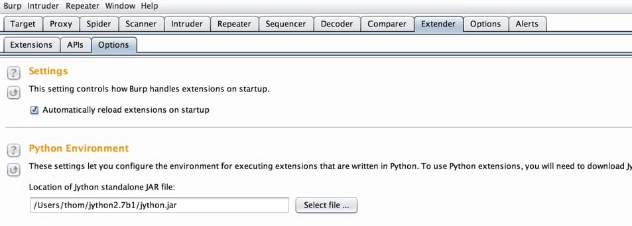
We'll begin with the install setup. First you need to get a Jython interpreter defined in Burp. I did this by going to the jython.org site and downloading the Jython 2.7beta1 "Traditional Installer." Following their instructions I built the jython.jar file that I'd use in Burp.
After you launch Burp go to the Extender tab and Options sub-tab to specify the path for the Python Environment (your jython.jar file).
Next go to the Extender, Extensions sub-tab, click the Add button, this will bring up a new window where you'll select Python as the Extension type and then input the path of the extension code.
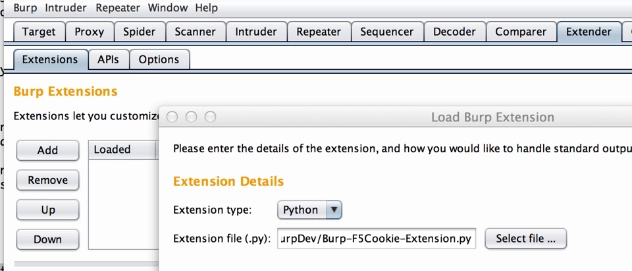
Click the Next button in the lower right corner and Burp will try to load the extension. If all goes well you won't see any errors.
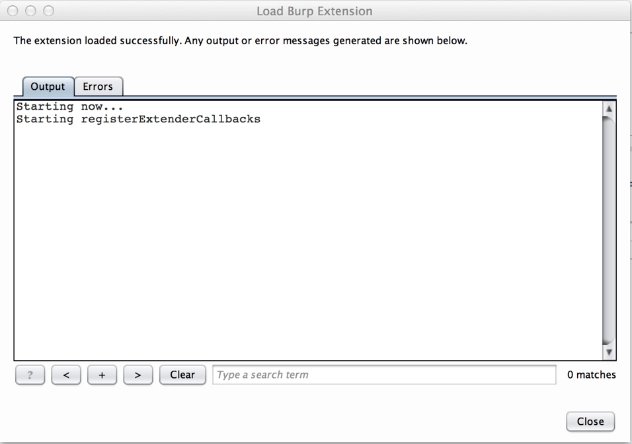
At this point the extension is loaded. Click the Close button and you're ready to go. From here use the browser of your choice configured to use Burp Proxy and find a site that uses the BigIP Cookie. When Burp does a passive scan, it will report it in the Scanner Advisory.
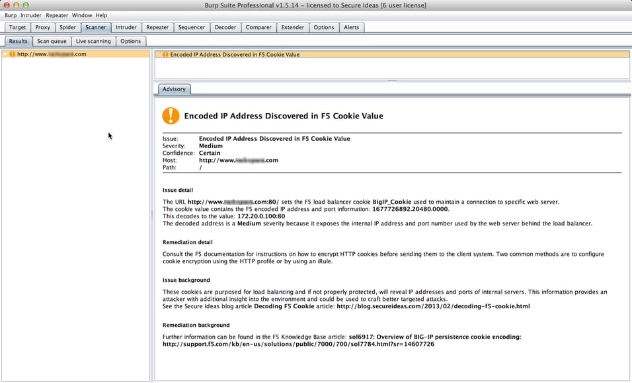
As you can see above, if the IP it decodes is an RFC1918 address, the finding is a medium risk. If it's any other IP, it lists the finding as a low.
Now that we have it installed and working let's talk about the code. The file with comments and spaces is 152 lines long. It begins with the obligatory list of imports the extension will need.
# setup Imports
from burp import IBurpExtender
from burp import IBurpExtenderCallbacks
from burp import IHttpListener
from burp import IHttpRequestResponse
from burp import IResponseInfo
from burp import IRequestInfo
from burp import IScannerCheck
from burp import IScanIssue
from burp import IScannerListener

import struct
import sys
import _google_ipaddr_r234

print "Starting now..."
Next we define a function based on James' blog post called decode(cookie_value). This function takes the F5 BigIP cookie value, decodes it and returns a dictionary list identifying the decoded IP address, port, and setting the severity which is based on the address being RFC 1918 compliant.
def decode(cookie_value):
    print 'Starting decode...'
    (host, port, end) = cookie_value.split('.')
    (a, b, c, d) = [ord(i) for i in struct.pack("<i", int(host))]="" p="[ord(i)" for="" i="" in="" struct.pack("<i",="" int(port))]="" portout="p[0]*256" +="" p[1]="" ipaddr="str(a)" '.'="" str(b)="" str(c)="" str(d)="" print="" "f5="" decoded:="" %s.%s.%s.%s:%s"="" %="" (a,b,c,d,portout)="" rfc1918="" isprivateip="_google_ipaddr_r234.IPAddress(ipAddr).is_private" if="" (isprivateip):="" else:="" cookiedict="{'address'" :="" ipaddr,="" 'port'="" portout,="" 'isprivateip'="" rfc1918}="" return="" cookiedict<="" pre="">
With the decoding logic in place, the next section defines the BurpExtender class and helper functions. Note there's one little bonus in here for those of us who get annoyed by having to manually turn off Burp's proxy intercept. When this extension loads the line callbacks.setProxyInterceptionEnabled(False) turns intercept off.
class BurpExtender(IBurpExtender, IHttpListener, IScannerCheck, IScannerListener, IScanIssue):
    def registerExtenderCallbacks(self, callbacks):
        print "Starting registerExtenderCallbacks"
        self._callbacks = callbacks
        self.helpers = callbacks.getHelpers()
        self._callbacks.setExtensionName("F5-BigIP Cookie Checker")
        callbacks.registerHttpListener(self)
        callbacks.registerScannerListener(self)
        callbacks.registerScannerCheck(self)
        callbacks.setProxyInterceptionEnabled(False)
Following this, we define the behavior of our custom passive scan and create our scan issue when a BigIP Cookie is found:
    ############################
    ### IScannerCheck ###
    def doPassiveScan(self, baseRequestResponse):
        print "Starting doPassiveScan..."
        analyzedResponse = self.helpers.analyzeResponse(baseRequestResponse.getResponse())
        analyzedRequest = self.helpers.analyzeRequest(baseRequestResponse)
        cookieList = analyzedResponse.getCookies()

        issues = list()
        # Loop though list of cookies
        for cookie in cookieList:
            cookieName = cookie.getName()
            # Look for BIGIP Cookies
            if cookieName.lower().startswith("bigip"):
                f5CookieName = cookieName
                f5RawCookieValue = cookie.getValue()
                f5info = decode(f5RawCookieValue)
                severity = f5info['isPrivateIP']
                f5DecodedIpValue = f5info['address']
                f5DecodedPortValue = f5info['port']

                issues.append(PassiveScanIssue(
                    baseRequestResponse.getHttpService(),
                    analyzedRequest.getUrl(),
                    f5CookieName,
                    f5RawCookieValue,
                    f5DecodedIpValue,
                    f5DecodedPortValue,
                    severity
                ))

        if len(issues) > 0:
            print 'Found F5 Cookie Issues'
            return issues
        else:
            print 'No F5 Cookie Issues Identified'
            return None
The last part of the code defines our PassiveScanIssue class. This is where the Scan Advisory information comes from. It's pretty much a template where we pass in the specific values that came from decoding the cookie value.
class PassiveScanIssue(IScanIssue):
    ############################
    def __init__(self, service, url, f5CookieName, f5RawCookieValue,
                 f5DecodedIpValue, f5DecodedPortValue, severity):
        self.service = service
        self.findingurl = url
        self.ident = f5CookieName
        self.value = f5RawCookieValue
        self.decodedAddress = f5DecodedIpValue
        self.decodedPort = f5DecodedPortValue
        self.issueSeverity = severity

    def getUrl(self):
        return self.findingurl

    def getIssueName(self):
        return "Encoded IP Address Discovered in F5 Cookie Value"

    def getIssueType(self):
        return 1

    def getSeverity(self):
        return self.issueSeverity

    def getConfidence(self):
        return "Certain"

    def getIssueDetail(self):
        msg = ("The URL " + str(self.findingurl) + " sets the F5 "
               "load balancer cookie " + self.ident + " used to "
               "maintain a connection to a specific web server.
"
               "The cookie value contains the F5 encoded IP address and "
               "port information: " + str(self.value) + ".")
        msg += ("
This decodes to the value: " +
                str(self.decodedAddress) + ":" +
                str(self.decodedPort) + "")
        if self.issueSeverity != "Low":
            msg += ("
The decoded address is a " +
                    self.issueSeverity + " severity because it "
                    "exposes the internal IP address and port number "
                    "used by the web server behind the load balancer.")
        return msg

    def getRemediationDetail(self):
        return ("Consult the F5 documentation for instructions on how "
                "to encrypt HTTP cookies before sending them to the "
                "client system. Two common methods are to configure "
                "cookie encryption using the HTTP profile or by "
                "using an iRule.")

    def getIssueBackground(self):
        return ("These cookies are purposed for load balancing and if "
                "not properly protected, will reveal IP addresses and "
                "ports of internal servers. This information provides "
                "an attacker with additional insight into the "
                "environment and could be used to craft better "
                "targeted attacks.")

    def getRemediationBackground(self):
        return ("Further information can be found in the F5 Knowledge "
                "Base article: sol6917: Overview of BIG-IP persistence "
                "cookie encoding.")

    def getHttpService(self):
        return self.service
The overall design can easily be modified for scanning other cookie values and I hope you're already thinking of other useful variations.
Want professionals checking your infrastructure for information leaks like this?
Our team builds and uses custom Burp extensions to find the configuration issues that automated scanners miss. Reach out to discuss a penetration test.
Talk to Our Team</i",>